Claude fast mode for Opus 4.8 ends on November 30, 2026. After that date, a Claude Code request to Opus 4.8 with fast mode on fails with an error rather than falling back to standard speed. The replacement is fast mode on Claude Opus 5.5, which Anthropic says is up to 2.5x faster and costs less per token. In the same weeks, plugins, skills and connectors moved to one Plugins page, Routines became Scheduled tasks and Claude Marketplace launched. Only fast mode and the Plugins page need action.
This is the checklist we ran on our own setup. Every date and setting comes from Anthropic's documentation, linked in each section, as at November 1, 2026.
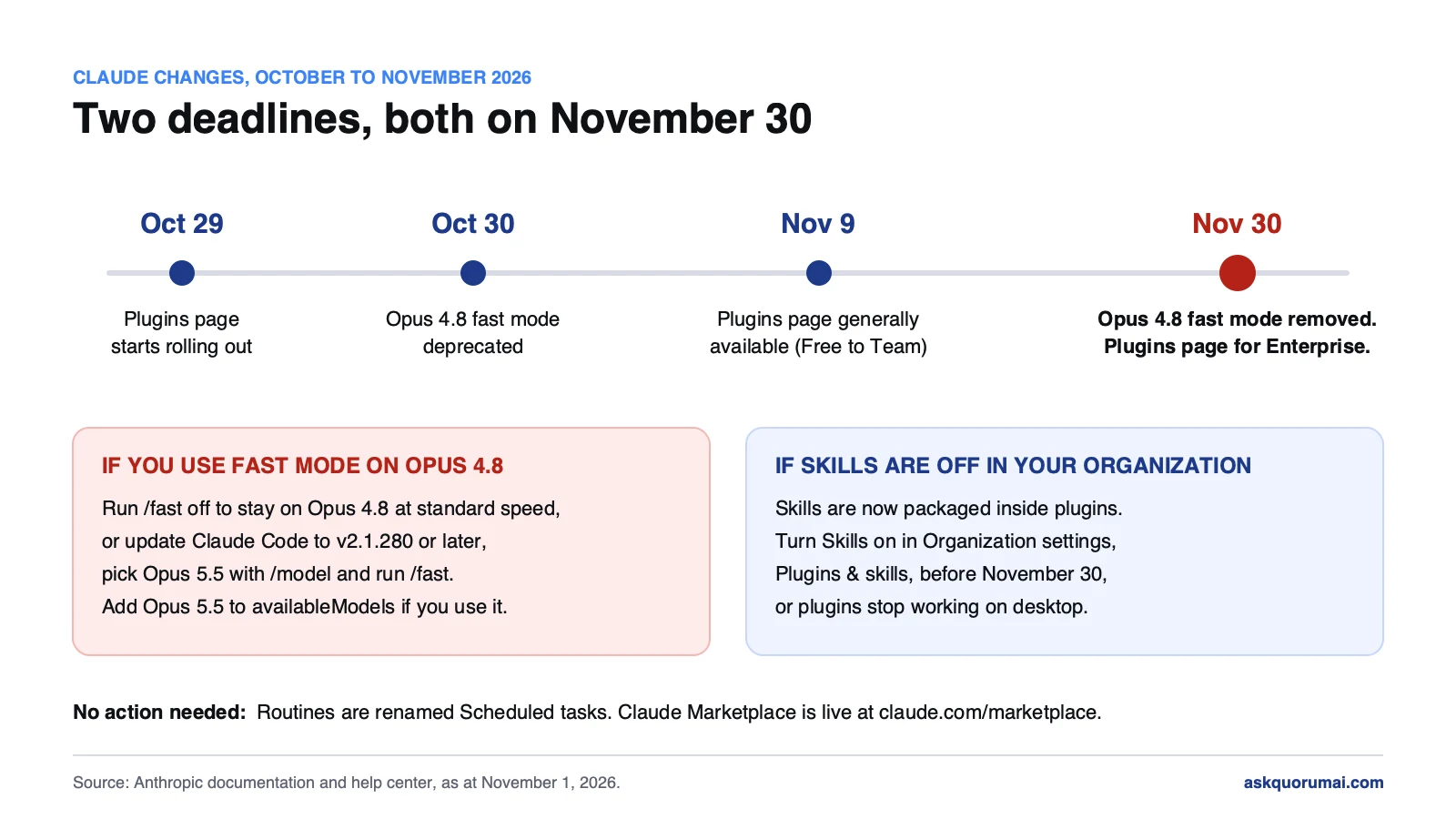
At a glance
| Change | Date | Action needed |
|---|---|---|
| Fast mode for Opus 4.8 retires | Removed November 30 | Yes, if you use fast mode on Opus 4.8 |
| One Plugins page | November 9 (Enterprise November 30) | Yes, if Skills are off in your organization |
| Routines renamed Scheduled tasks | Now | Only with self-hosted environments |
| Claude Marketplace | Live since September 23 | No |
1. Claude fast mode: move from Opus 4.8 to Opus 5.5
Fast mode is not a separate model. It is the same Claude Opus model served with an API configuration that trades cost for speed. Anthropic's fast mode documentation describes it as up to 2.5x faster at a higher price per token, and it is available only on Opus.
What changes on November 30 is narrow. Fast mode on Opus 4.8 goes away. Opus 4.8 at standard speed stays. So there are two ways through:
- Stay on Opus 4.8. Run
/fast off. Nothing else changes. - Keep the speed. Update Claude Code to v2.1.280 or later, pick Opus 5.5 with
/model, then run/fast. From v2.1.280, Opus 5.5 is the default model for fast mode.
Claude Opus 5.5 fast mode pricing and plans
The price moves in your favour. Anthropic's documentation lists fast mode at $8 / $40 per million input / output tokens on Opus 5.5, against $10 / $50 on Opus 4.8.
On Pro, Max, Ultra, Team and Enterprise plans, fast mode is not part of the plan's included usage. It is paid from usage credits, and it draws on them even when you have plan usage left. Turn usage credits on under Settings, Usage on claude.ai, or run /usage-credits. On Team and Enterprise, an Owner also has to enable fast mode for the organization first.
When Claude fast mode is not working
/fast tells you why it refused, and the message points at the fix:
- "Fast mode requires usage credits": usage credits are off for your account or organization.
- "Fast mode has been disabled by your organization": an Owner has not enabled it, or managed settings set
fastModeto false. - "is not in your organization's allowed models": the
availableModelsallowlist does not include the fast mode model. Add Opus 5.5. - No fast mode at all: you reach Claude through Amazon Bedrock, Google Cloud or Microsoft Foundry, where fast mode is not offered.
After November 30, add one more cause to the list: fast mode still switched on for Opus 4.8.
Where it breaks quietly
The interactive case is easy, because a person sees the error and switches. The cases that break at 2am are the ones nobody is watching:
- Scripts and CI jobs that start Claude Code with
--settings '{"fastMode": true}'and a pinned Opus 4.8 model id. - Managed settings that pin the model, or restrict models with
availableModelswithout Opus 5.5 on the list. - Anything keyed on a model id. Cost dashboards, status lines, proxy routing rules and log parsers often hold a table of model ids. Check that
claude-opus-5-5is in it, and check how the lookup matches. When we went through our own Claude Code kit, we found a status-line table that matches model ids by substring, soclaude-opus-5-5would be read asclaude-opus-5and get that model's numbers. It only mattered on a fallback path, but it is exactly the kind of thing a model migration exposes.
2. The new Claude Plugins page: check Skills before November 30
Claude is replacing its separate Skills, Connectors and Plugins tabs with a single Plugins page. The "Customize" item in the sidebar becomes "Plugins". Anthropic's help article gives the timing: rolling out since October 29, generally available on November 9 for Free, Pro, Max, Ultra and Team plans, and November 30 for Enterprise.
For members, little changes. Existing plugins, skills and connectors stay installed, public items are labelled Verified or Community, and skills are called from chat with + or / as before. One detail worth knowing: removing a plugin that bundled a connector does not disconnect that connector. If you are cleaning up access, remove both.
The admin action. Skills are now packaged inside plugins. If your organization has Skills turned off, plugins stop working in the Claude desktop app, Cowork and the Code tab once the change reaches you. To keep them working, an admin turns Skills on in Organization settings → Plugins & skills, on the Policy tab, before November 30.
If you turned Skills off on purpose, for example to keep unreviewed instructions away from regulated data, this is the moment to decide whether that policy now means "no plugins either", and to tell your team before their tools stop working rather than after.
Claude plugins vs skills vs connectors
The one-page view makes the three easier to confuse, so here is the difference in Anthropic's own terms:
| What it is | Use it when | |
|---|---|---|
| Skill | Written instructions, optionally with scripts and reference files, that Claude loads when a task calls for them | You want Claude to follow your process, such as a release-note format or a contract checklist |
| Connector | A connection to an MCP server that lets Claude read from and act in a tool or data source | Claude needs your files, calendar, issue tracker or an internal API |
| Plugin | An installable package that can hold skills, connectors, commands and agents | You want several of them installed and shared as one unit |
A skill or a connector can still be added on its own. A plugin is how a team ships its standard setup in one install.
3. Claude Routines are now Scheduled tasks
Routines, still a research preview, have a new name: Scheduled tasks, in Claude on the web and in the desktop app. Existing routines carry over and keep running. One form now creates both Cowork tasks and Claude Code tasks.
One detail matters if your organization runs Claude Code in self-hosted environments. A task created from the Code tab without a repository is a Cowork task, and Cowork tasks run in Anthropic's cloud. That is not new, since cloud Cowork tasks already ran there, but the new form makes it easy to create one from a tab your team associates with your own runners. If some work must stay on your infrastructure, say so in your internal guidance.
The organization switch has also been renamed. It now reads Scheduled tasks in Organization settings → Capabilities, under Remote sessions, and your current setting carries over.
4. Claude Marketplace
Claude Marketplace, launched on September 23, 2026, puts the plugins, connectors, agents, products and service partners built for Claude in one place, with more than 2,000 connectors and plugins at launch. Nothing to do here. Point your team at claude.com/marketplace when they ask what works with Claude. Members still add connectors and plugins inside Claude, not on the Marketplace page.
The checklist
- Search your scripts, CI configs and managed settings for Opus 4.8 model ids with fast mode on. Move them to Opus 5.5 or turn fast mode off.
- Update Claude Code to v2.1.280 or later everywhere fast mode is used.
- If you use
availableModels, add Opus 5.5. - Check every model-id lookup table you own for
claude-opus-5-5, and check how it matches. - If Skills are off in your organization, decide before November 30 whether plugins should keep working, and turn Skills on if they should.
- If you use self-hosted environments, tell your team that a Code-tab Scheduled task with no repository runs in Anthropic's cloud.
For a team that already treats Claude Code configuration as code, this is an afternoon. For a team where every developer set things up their own way, the first step is finding out what everyone actually runs, and that is usually the longer job.
Common questions
It stops working. Anthropic deprecated fast mode for Opus 4.8 on October 30, 2026 and removes it on November 30, 2026. After that date a Claude Code request to Opus 4.8 with fast mode on returns an error. Opus 4.8 itself keeps working at standard speed, so running /fast off is enough if you want to stay on it.
Update to Claude Code v2.1.280 or later, choose Opus 5.5 with /model, then run /fast. From v2.1.280 Opus 5.5 is the default model for fast mode. If your organization limits models with the availableModels setting, Opus 5.5 has to be on that list or /fast is refused.
No, it is cheaper. Anthropic's Claude Code documentation lists fast mode at $8 per million input tokens and $40 per million output tokens on Opus 5.5, against $10 and $50 on Opus 4.8.
Not in the plan's included usage. On Pro, Max, Ultra, Team and Enterprise plans, fast mode is paid from usage credits, and it draws on them even when you still have plan usage left. You turn usage credits on in Settings, Usage on claude.ai, or run /usage-credits in Claude Code. On Team and Enterprise an Owner also has to enable fast mode for the organization.
The usual causes are, in order. Usage credits are off, and /fast says "Fast mode requires usage credits". Your Team or Enterprise organization has not enabled it, or managed settings turn it off, and /fast says it has been disabled by your organization. The availableModels allowlist excludes the fast mode model. Or you reach Claude through Amazon Bedrock, Google Cloud or Microsoft Foundry, where fast mode is not available. After November 30 there is one more, fast mode still switched on for Opus 4.8.
A skill is written instructions, optionally with scripts and reference files, that Claude loads when a task calls for them, for example your release-note format. A connector gives Claude access to a tool or data source through MCP. A plugin is an installable package that can hold skills, connectors, commands and agents, so a team can install and share them as one unit. You can still add a skill on its own.
Yes. Routines, which are still in research preview, have been renamed Scheduled tasks in Claude on the web and in the desktop app. Existing routines carry over and keep running, and one form now creates both Cowork and Claude Code tasks.
Law and guidance as at 1 November 2026. This is general information, not legal advice.