DeepSeek Harness is an open-source agent harness from DeepSeek AI, published on GitHub as deepseek-ai/deepseek-harness under the MIT License. A harness is the software around a model that turns it into an agent: tools, memory, permissions and the loop that decides what to do next. This guide shows how to install it, connect a model, extend it and run it without putting your machine at risk.
The repository had over 258,000 GitHub stars when we checked on 23 October 2026. The project is a developer preview, so treat this guide as a snapshot of release dsh-v0.2.1-rc.2 and check the docs before you rely on a detail.
What it is
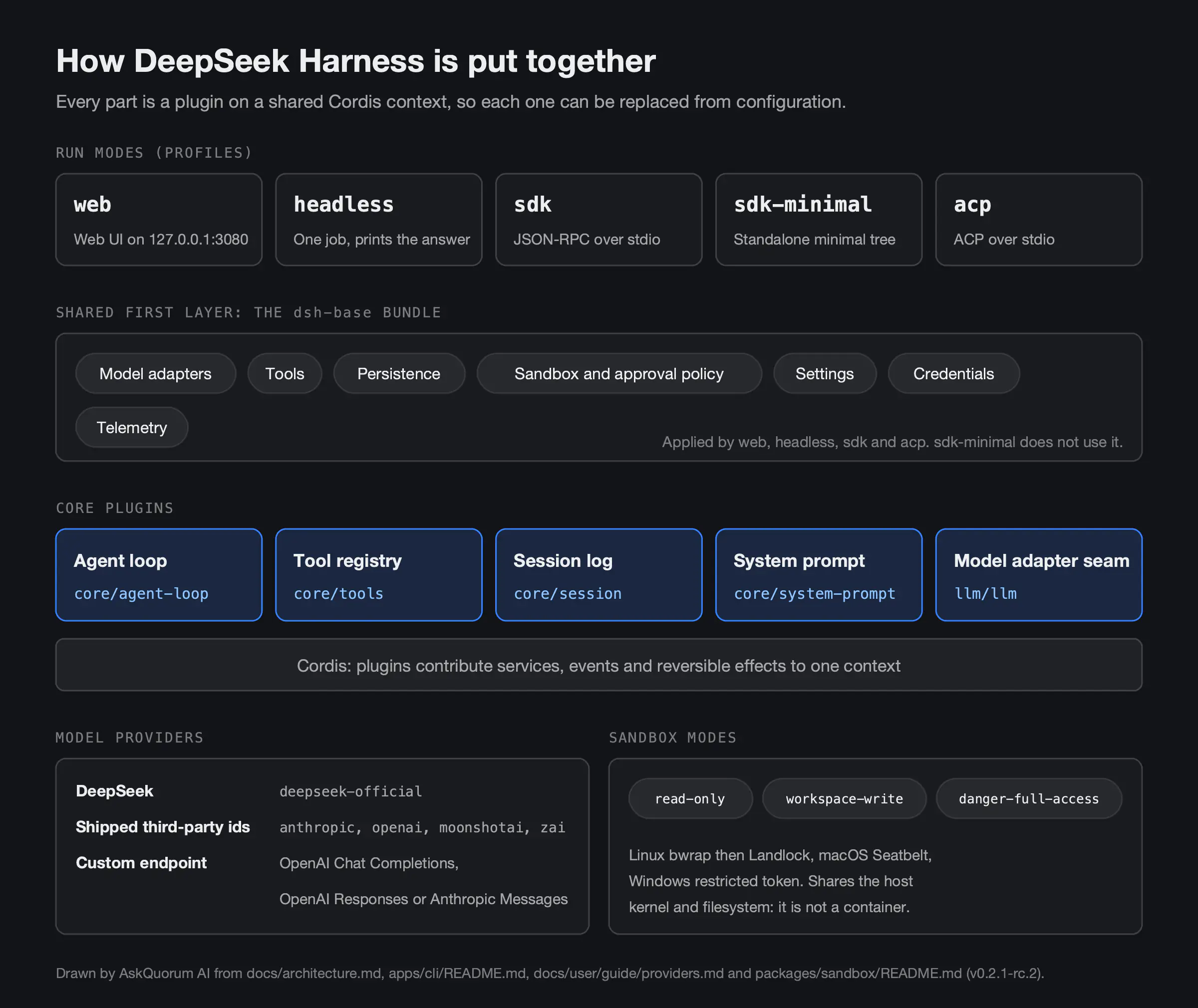
The README (DeepSeek, 2026) describes an "everything-is-a-plugin" architecture built on Cordis, a plugin framework. The architecture guide says every part is a plugin, "including the model adapter, the tool registry, the session log, and the agent loop itself". Each one can be replaced from configuration. There is no privileged core to patch.
In practice the agent can read and edit workspace files, run commands, delegate work and maintain a plan. That is the same job a closed coding agent does. The difference is that you can open every layer and swap it out.
Two warnings come first in the README. It says, in capitals, "THERE WILL BE COMPATIBILITY-BREAKING CHANGES". It also asks you to read the safety notice before running anything, which we cover below.
Install and run DeepSeek Harness
You need Node.js. The repository's package.json declares Node ^22.19.0 or 24 and later. Then one command starts the Web UI:
npx @deepseek-ai/dsh webThe Web UI opens at http://127.0.0.1:3080. Pass --no-open to start the server without opening a browser. To run from source instead, the README gives git clone, pnpm install, pnpm run build and pnpm dsh web.
The first run takes three steps, per the Web UI guide (DeepSeek, 2026):
- Open Settings, then Models, and enter a DeepSeek API key from platform.deepseek.com.
- Click Choose workspace and add the project folder. The composer stays locked until you pick one.
- Start a session and send a task, such as "Summarize this repository and identify its main packages."
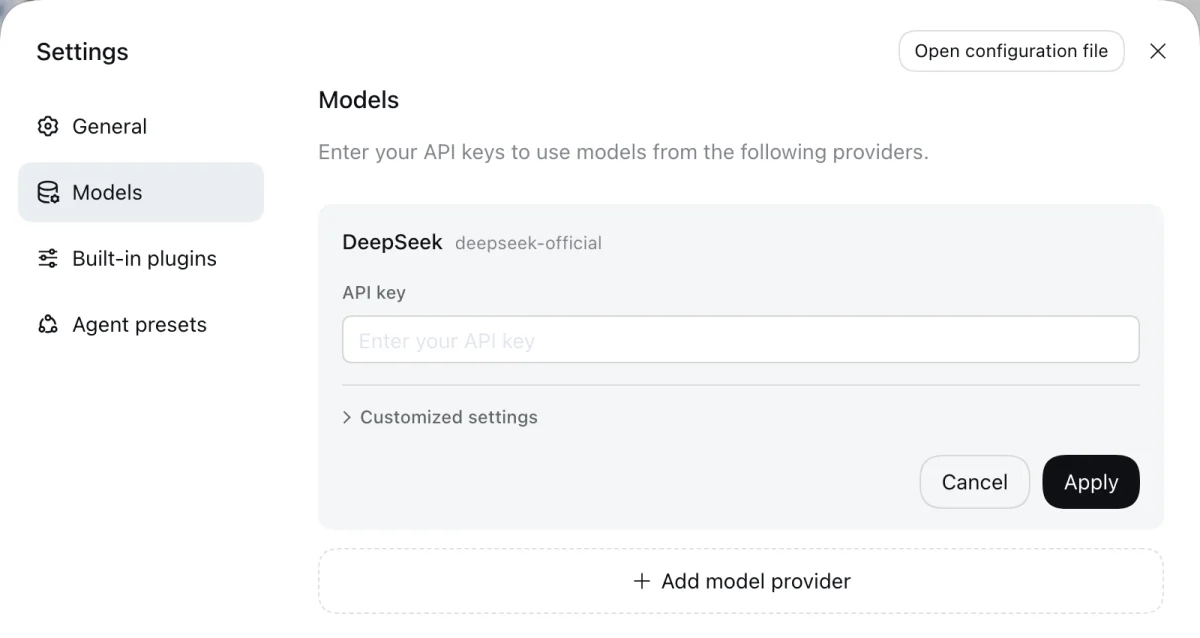
Keys are write-only in the interface. The provider guide says the key is stored in $DSH_HOME/.credentials.yaml, and settings keep only a reference to it.
DeepSeek also lists desktop downloads for macOS on Apple Silicon and 64-bit Windows on its harness page. We found no official Linux desktop build.
Other ways to run it
The same dsh command boots different profiles, according to the CLI reference:
| Profile | Command | What it is for |
|---|---|---|
| web | dsh web | The browser interface |
| headless | dsh --profile headless "job" | One job, prints the answer, exits |
| sdk | dsh --profile sdk | SDK clients over JSON-RPC on stdio |
| sdk-minimal | dsh --profile sdk-minimal | A standalone minimal agent tree |
| acp | dsh --profile acp | Automation clients over ACP on stdio |
There is also a Python SDK. The Python guide asks for Python 3.10 or newer and Git. It supports Linux x64 and arm64, macOS 14 or newer on arm64, and Windows x64. Install it with python -m pip install deepseek-harness-sdk and set DEEPSEEK_API_KEY. The wheel bundles its own runtime, so normal SDK use needs no system Node.js.
Pick a model provider
DeepSeek is the default, but it is not the only option. The provider guide lists shipped provider ids such as anthropic, openai, moonshotai for Kimi, and zai for GLM. Pick one under Add model provider, enter its key and save.
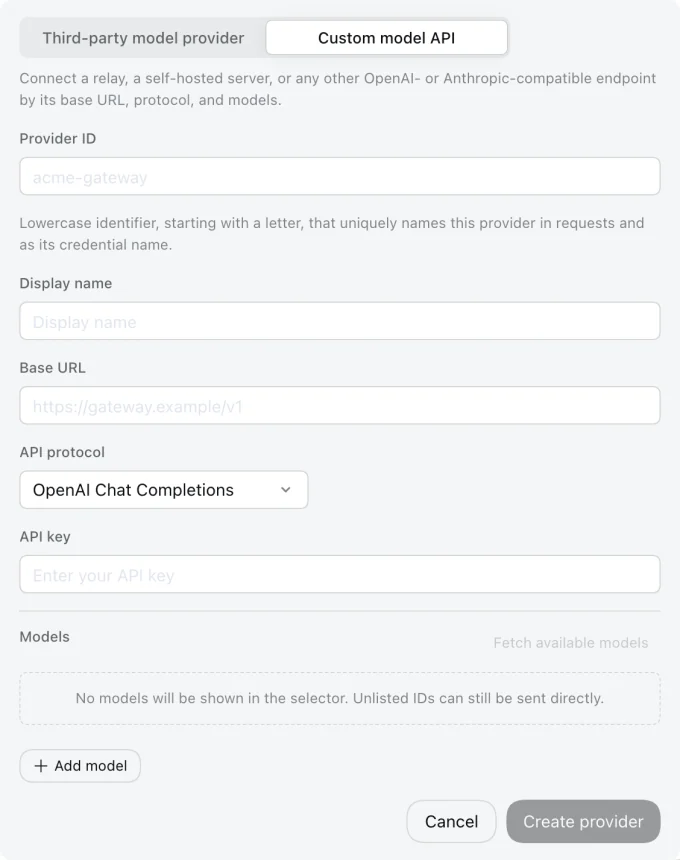
For anything else there is Custom model API. It takes a provider ID, base URL, API protocol, key and at least one model. The protocol must be OpenAI Chat Completions, OpenAI Responses or Anthropic Messages. That covers a company gateway, a relay or a self-hosted inference server.
Check model ids against the docs you are using. They are not consistent across DeepSeek's own pages. The Python guide uses deepseek-v4-flash. The DeepSeek adapter README lists deepseek-flash and deepseek-v4-pro as defaults, each with a 1,000,000-token context window. In the Web UI, pick from the model picker rather than typing an id from memory.
Plugins: adapters, tools and the loop
Because everything is a plugin, extending the harness means mounting a plugin beside the others. A profile is an ordered stack of bundles plus your own cordis.patch.yml. To see the plugin tree your machine boots, the architecture guide gives:
dsh --profile web --dump-configAny row that command prints can be replaced by a patch. Plugins are installed per profile with dsh plugin --profile <name> <pnpm args>. The docs include a tutorial for writing a tool plugin.
Plugin markets are an experimental, opt-in feature. The market guide warns that "Markets are third-party content". Add only sources you trust, and use https.
Safety: run it somewhere disposable
Read the safety notice (DeepSeek, 2026) before you start. It says the project "has not undergone a security audit" and must not be treated as secure or production-ready. It can "execute model-generated code and commands, load third-party plugins, and access the network, processes, credentials, and files". DeepSeek recommends a "disposable virtual machine, container, or dedicated environment".
The built-in sandbox helps, but it is not isolation. The sandbox README lists three modes: read-only, workspace-write and danger-full-access. It uses bwrap then Landlock on Linux, Seatbelt on macOS and a restricted token on Windows. It is "same-world only", sharing the host kernel and filesystem.
A short checklist before your first real task:
- Run it in a container or throwaway VM, not on your main laptop account.
- Mount only the repository you are working on, with backups.
- Use a provider key with a spending limit, and never your production credentials.
- Start in
read-onlyorworkspace-write, and leavedanger-full-accessoff. - Review every plugin and proposed command before you approve it.
What it is good for
From the docs, these are the uses that fit the preview today:
- Triage an unfamiliar repository. Summarise its structure, then fix failing tests in a disposable workspace.
- Headless jobs in CI. For example,
dsh --profile headless "run the tests". - Agents inside your own tools. Embed the agent in Python scripts or evaluation runs through the SDK.
- Comparing models. Run the same task through DeepSeek, Anthropic, OpenAI or an internal gateway and compare cost and output.
- Team tooling. Write and share a custom tool plugin, or host a private plugin market.
All of these are development work. None of them is the same as running an agent your customers depend on.
How it compares with other harnesses
Independent comparisons are still thin. A daily.dev write-up (2026) contrasts it with Claude Code, which it calls "a closed product you can't inspect or modify". It also notes that the harness ships sub-agent packages that can spawn Claude Code or Codex processes as tools. We found no source comparing it with OpenHands, Aider or SWE-agent, so we will not guess.
From a harness to production
A harness answers whether an agent can do the task. Production asks whether your organisation can be accountable for what it did. We covered that gap in why AI agent pilots fail. The production step also costs more than the pilot, as our breakdown of AI agent development cost shows. If you started from a generated prototype rather than an agent, read taking an AI prototype to production instead.
Common questions
DeepSeek Harness, run as the dsh command, is an open-source agent harness from DeepSeek AI, released under the MIT License. It wraps a language model with tools, a session log, sandboxing and an agent loop. The model can then read and edit files, run commands, delegate work and keep a plan. Every part, including the agent loop, is a replaceable plugin.
The code is free under the MIT License. The models are not, because the harness calls hosted APIs, so you pay the provider for usage. The documentation does not ask for a local GPU. The quick-start guide asks for a DeepSeek API key from platform.deepseek.com.
Yes. The provider guide lists shipped provider ids such as anthropic, openai, moonshotai for Kimi and zai for GLM. It also accepts custom endpoints that speak OpenAI Chat Completions, OpenAI Responses or Anthropic Messages, which covers many company gateways and self-hosted servers.
Its own safety notice says it has not had a security audit and must not be treated as secure or production-ready. It can run model-generated commands, load third-party plugins and reach your files and network. DeepSeek recommends a disposable virtual machine, container or dedicated environment, and so do we.
Law and guidance as at 23 October 2026. This is general information, not legal advice.