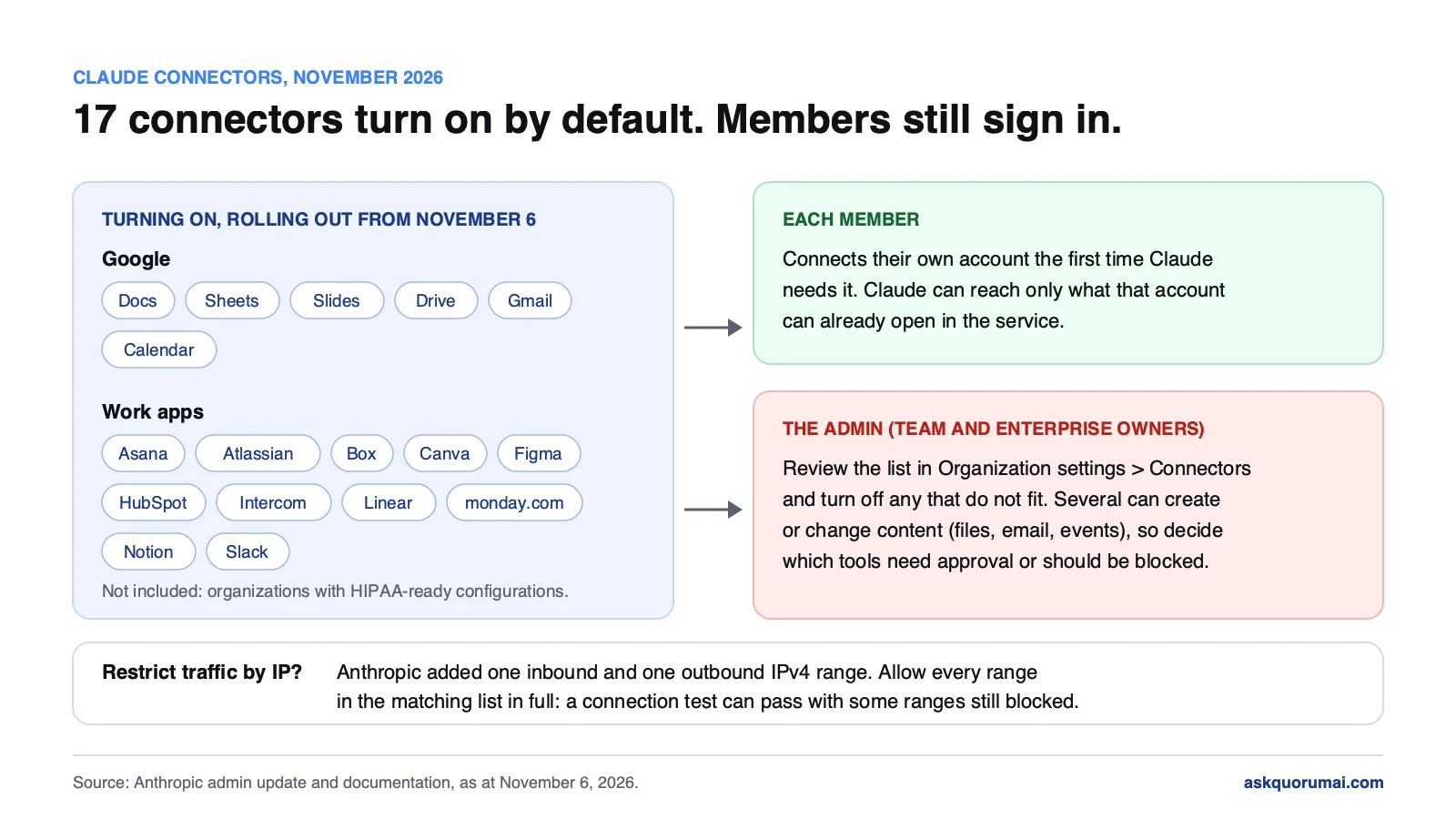
Claude connectors are turning on by default. From November 6, 2026, seventeen of them roll out to organizations, including the new Google Docs, Sheets and Slides connectors that let Claude edit those files directly. No one's data is connected automatically: each member still signs in to their own account the first time Claude needs it. What changes is that an admin no longer has to add these connectors before members can use them, so the review that used to happen first now happens after. Anthropic has also added two IPv4 ranges to its public address lists, which matters only if you filter traffic by IP.
We received this as an admin notice from Anthropic. Every list, setting and range below is checked against Anthropic's documentation, linked in each section, as at November 6, 2026.
At a glance
| Change | Who it affects | Action needed |
|---|---|---|
| Google Docs, Sheets and Slides connectors turn on | Every member, once they connect Google | Review, then turn off if it does not fit |
| 17 default connectors turn on | Team and Enterprise organizations, except HIPAA-ready | Review in Organization settings → Connectors |
| Two new Anthropic IPv4 ranges | Only networks that allowlist Anthropic's addresses | Yes, update the firewall rule |
1. Claude connectors list: which turn on by default
A connector links Claude to an outside app or service through MCP, so Claude can find information there and take actions for you. Until now, on Team and Enterprise plans, a connector such as Google Drive did not appear for members until an Owner added it for the organization. These seventeen now start on:
| Group | Connectors |
|---|---|
| Google Docs, Google Sheets, Google Slides, Google Drive, Gmail, Google Calendar | |
| Work apps | Asana, Atlassian, Box, Canva, Figma, HubSpot, Intercom, Linear, monday.com, Notion, Slack |
Organizations with HIPAA-ready configurations are not included. If you handle protected health information, nothing turns on for you, and that is deliberate. Anthropic's help page for the Google Workspace sidebar says plainly not to use it with protected health information either.
What the Claude Google Docs, Google Sheets and Google Slides connectors do
These three are new and still in beta. According to Anthropic's Google Workspace connectors article, Claude can:
- create new Google Docs, Sheets and Slides files,
- edit a file live in a pane beside the chat, while you work in the same file,
- read and work with comments and suggestions in Google Docs.
Two limits: Claude cannot add charts to Google Slides, and Slides edits may not appear live in the pane. In Google Docs it sees comments and suggestions but not images.
They are separate from Google Drive, which searches and reads your files, and separate again from Claude for Google Workspace, the sidebar that Google Workspace admins install from the Google Workspace Marketplace. If your team asks "is Claude in our Docs now?", the honest answer is that there are two routes, and each has its own admin.
2. What changes for members
Less than the headline suggests. Anthropic's connector guide sets out three things that still hold:
- Each person signs in to their own account. Turning a connector on for the organization connects nobody. A member is asked to connect the first time Claude needs the service.
- Claude inherits that person's permissions. If someone cannot open a file, channel or record in the source system, the connector cannot reach it from Claude either.
- Members choose per conversation. The + menu in the message box lists connectors with a toggle, and Claude can ask before it uses a tool. Allow once continues, Always allow skips the prompt for that tool from then on.
One detail is easy to miss. Connectors added in claude.ai are also available in Claude Code when a developer signs in with their Claude account, in the terminal and in cloud sessions. A member who connects Slack in chat can use it from Claude Code too.
3. What admins should review
The admin action is short: to turn any connector off once it is on, go to Organization settings → Connectors. The decision behind it is the real work.
Decide which ones fit. Seventeen connectors is a lot of new surface on one day. For each, ask whether your data policies allow it, whether you already license the service, and whether it should be available to everyone or not at all. One that reaches a system you keep away from AI tools should go off before members connect it, not after.
Decide what Claude may change. Several of these can create or change content, not only read it: the Google Docs, Sheets and Slides connectors edit files, and Anthropic's article says Gmail and Drive support read and write operations with approval, while Calendar can create and manage events. Members set Always allow, Needs approval or Blocked for each tool on the connector's page, and Owners on Team and Enterprise plans can limit which actions a connected service can take across the organization.
Check the Google side. Anthropic notes that organizations on Google Workspace may need an admin at admin.google.com to mark Claude as Trusted under third-party app access settings. If members report that the Google connectors fail at sign-in, look there before you look at Claude.
Write it down. A short note to your team saying which connectors are on, which tools need approval and who to ask saves a week of "is this allowed?" messages. If you went through the plugins vs skills vs connectors decision for the new Plugins page, this is the same conversation.
4. Anthropic IP addresses: two new ranges
This section matters only if your firewall or allowlist names Anthropic's addresses. Anthropic has added two IPv4 ranges, one inbound and one outbound, and removed nothing. Its IP addresses page now lists:
| Direction | What it is for | IPv4 | IPv6 |
|---|---|---|---|
| Inbound | Where Anthropic receives connections from your network | 160.79.104.0/23, 153.61.224.0/22 | 2607:6bc0::/48 |
| Outbound | Where Anthropic connects to your systems, such as GitHub or MCP servers | 160.79.104.0/21, 153.61.208.0/20 | none listed |
Allow every range in the matching list in full. Anthropic's own warning is the useful part: a connection test can pass with some ranges still blocked. Check the rule itself, not the test result. Outbound matters most for anything Claude calls on your side, such as a self-hosted MCP server behind a firewall.
While you are in the rule, check for the five old 34.162.x.x/32 addresses. Anthropic lists them as phased out and says to remove them if you allowlisted them before.
The checklist
- Open Organization settings → Connectors and review the seventeen defaults.
- Turn off any connector that reaches a system you keep away from AI tools.
- For connectors that can write, decide which tools need approval or should be blocked.
- If you use Google Workspace, check whether Claude needs to be marked Trusted in the Google admin console.
- Tell your team which connectors are on and where to ask about the rest.
- If you allowlist Anthropic's addresses, add every inbound and outbound range in full, and remove the phased-out
34.162.x.xaddresses.
For an organization that already has a written AI tools policy, this is an hour. For one that does not, the default-on change is a good reason to write one, because the next default will arrive the same way.
Common questions
Seventeen, rolling out from November 6, 2026. Asana, Atlassian, Box, Canva, Figma, HubSpot, Intercom, Linear, monday.com, Notion and Slack, plus Google Drive, Gmail, Google Calendar, Google Docs, Google Sheets and Google Slides. Organizations with HIPAA-ready configurations are not included.
No. Each member connects their own account the first time Claude needs it, and Claude inherits that person's permissions in the service. If someone cannot open a file, channel or record in the source system, the connector cannot reach it from Claude either.
On Team and Enterprise plans, an Owner goes to Organization settings, Connectors, and turns off or removes the connector. Members can also turn a connector off in their own app, and switch it on or off for each conversation from the + menu.
Yes, through the Google Docs, Sheets and Slides connectors, which are in beta. Claude can create new files, edit them live in a pane beside the chat, and read comments and suggestions in Google Docs. It cannot add charts to Google Slides.
The connectors work from Claude, where you ask Claude to create or edit a Google file. Claude for Google Workspace is a separate sidebar, installed from the Google Workspace Marketplace, that puts Claude inside the Doc, Sheet or Slides file you have open. Google Workspace admins control the sidebar install; Claude admins control the connectors.
Inbound, where Anthropic receives connections, 160.79.104.0/23 and 153.61.224.0/22 for IPv4 and 2607:6bc0::/48 for IPv6. Outbound, where Anthropic connects to your systems such as MCP servers, 160.79.104.0/21 and 153.61.208.0/20. Allow every range in the matching list in full.
Law and guidance as at 6 November 2026. This is general information, not legal advice.