On this page
Claude Code has been writing secrets into a file that teams commit. In early November 2026 security firm Apiiro published research showing that when a developer answers "Yes, and don't ask again" to a shell command, Claude Code saves that command, word for word, in .claude/settings.local.json. If the command contained a database password or an API token, so does the file. Apiiro found 2,539 secrets in 1,994 public GitHub repositories this way. Here is how it happens, how to check your own repositories in five minutes, and how we keep secret values out of our agent's approvals altogether.
Every figure below is from Apiiro's published research, and Claude Code's behaviour is checked against Anthropic's own documentation as at November 15, 2026.
At a glance
| Finding | Number |
|---|---|
Public copies of .claude/settings.local.json scanned | 104,185 |
| Files containing at least one secret | 1,122 |
| Distinct secrets in those files | 1,379, across 63 organizations |
| Secrets including file history, shared settings files and agent transcripts | 2,539, in 1,994 repositories |
| Repositories with a secret where a commit co-authored by Claude changed the file | 539 of 1,105 traced |
| Leaking files missed by both Gitleaks and TruffleHog | 215 |
1. How the Claude Code secrets leak happens
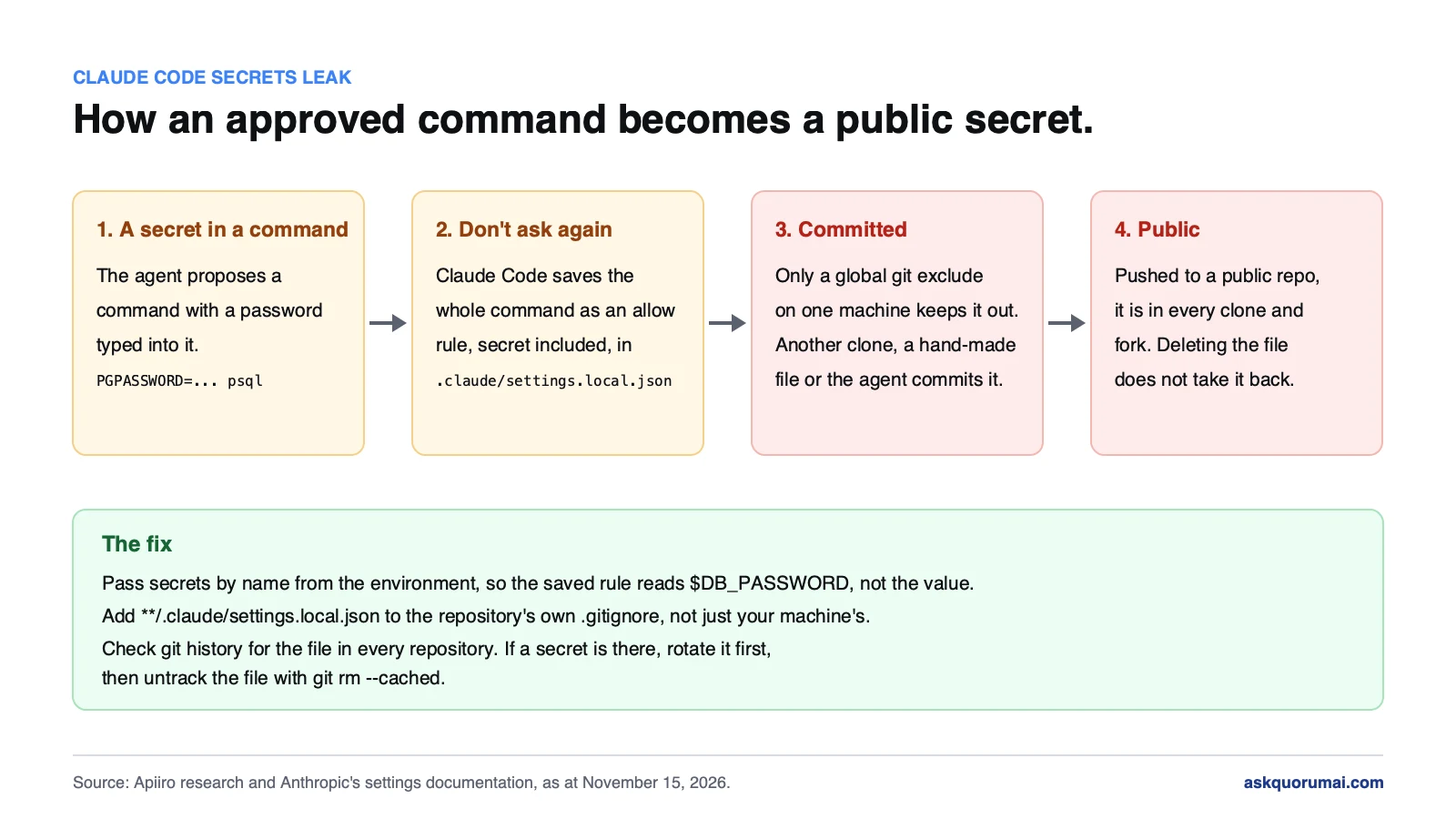
Claude Code asks before it runs a shell command. Answer "Yes, and don't ask again" and, according to Anthropic's settings documentation, it saves that approval as an allow rule in .claude/settings.local.json at the root of the repository. The rule is the command itself. A command such as PGPASSWORD=… psql -h db.internal becomes a permanent line in a JSON file in your project.
Anthropic's documentation also says Claude Code keeps the file out of git: the first time it writes it, it adds **/.claude/settings.local.json to your global git excludes. That protects one developer, on one machine. It does nothing for:
- a clone of the project on another machine,
- a folder that only becomes a git repository later,
- a file created by hand, or one already committed,
- a commit made by the agent itself.
Apiiro reports the rule never goes into the project's own .gitignore, and that once the file is tracked, the next approval is simply added to the tracked copy without telling the user. In 539 of the 1,105 leaking repositories it traced, a commit co-authored by Claude changed the file: Claude Code's commit instructions warn against committing .env, but not its own settings file. Apiiro looked at 16 coding agents; Claude Code was the only one confirmed to save the full approved command in a project file by default.
More than a third of the secrets open a database directly: Apiiro counted 379 database passwords and 122 Supabase service-role keys, plus 43 SSH logins, 42 GitHub, GitLab and npm tokens, 23 AWS keys and 6 private keys. One organization confirmed its key had been live. The longer a developer has been clicking "don't ask again", the more the file holds: one in ten files over 8 KB had a real secret.
2. Why your secret scanner may miss it
Of the 1,122 leaking files, Gitleaks caught 564 and TruffleHog caught 643. 215 files escaped both. The misses were mostly passwords typed in the middle of a command, such as PGPASSWORD=… or -p…, which look like ordinary words to a scanner tuned for key formats.
So a clean scanner report is not a clean repository. If your team relies on pre-commit scanning, keep it, and run the direct check below as well. We made the same point about trusting automated checks in AI-generated code and technical debt.
3. Check your repositories in five minutes
Run these in each repository. The first finds the file in the current tree, the second in any branch's history:
git ls-files | grep -E '\.claude/settings(\.local)?\.json'
git log --all --oneline -- '**/.claude/settings.local.json' '**/.claude/settings.json'
The shared settings.json matters too: teams commit it on purpose, and Apiiro found real secrets in 298 of them. No output means neither file was ever committed. If either prints anything, look inside the file and its old versions for passwords, tokens, keys and URLs with a username and password in them. Look at the approved commands themselves, not just for things that look like keys.
On GitHub, also search your organization's code for the file name. Forks keep their own copy, so a public fork can hold a secret after the original is cleaned. Finally, open the local copy on each developer's machine: a file that was never committed still lists the systems a developer can reach and the passwords that open them, one file search away for malware.
4. If you find a secret: rotate first
Order matters. A pushed secret is in every clone and fork made since, so deleting the file protects nothing that has already gone.
- Rotate the secret at its source: the database, the cloud console, the token issuer. Check its access logs for use you do not recognise.
- Stop tracking the file:
git rm --cached .claude/settings.local.json. - Ignore it in the repository, not only on your machine: add
**/.claude/settings.local.jsonto the project's.gitignore. - Decide on history. On a public repository, purge it and assume the value is compromised anyway. On a private one, rotation matters more than the purge.
5. Stop it happening again
- Never put a secret value in a command. Load it into the environment and refer to it by name, so the approved command reads
$DB_PASSWORD, not the password. - Approve patterns, not one-off commands with values in them. An allow rule such as
Bash(npm run test *)is safe to save. A rule containing a credential is not. - Put the ignore rule in the repository. One line in
.gitignorecovers every machine and every teammate. - Make a hook enforce it. Claude Code's hooks can block a tool call before it runs, which is the only part of the setup that stops work rather than advising. We explain how we use them in our Claude Code setup.
How to pass secrets to Claude Code with environment variables
The difference is what ends up in the command, and so in any rule Claude Code saves from it.
# Leaks: the value is in the command, and "don't ask again" saves it
PGPASSWORD='the real password' psql -h db.internal -U app

# Safe: the command names a variable; the value never appears
PGPASSWORD="$DB_PASSWORD" psql -h db.internal -U app
Where the variable comes from matters as much:
- From a secret manager's run command. Tools such as 1Password's
op run,doppler runandinfisical runfetch the secret and put it in the environment of that one command. The session sees the command, not the value. - From a file the agent never reads. A
.envfile outside the repository, or one listed in.gitignoreand denied to the agent with aReaddeny rule, keeps the value off the screen. - Not from
.claude/settings.json. Claude Code's settings accept anenvblock, but that file is often committed. A secret there is the same leak by a different route.
Anthropic's head of Claude Code replied on Hacker News that the team will prototype countermeasures, including basic secret scanning and making auto mode catch this. Until something ships, treat the steps above as yours.
Claude Code security: how we keep secrets out of the session
This is the part of our own setup the research tests, so here is what it does. These controls are part of how we run Claude Code inside our AI SDLC, on every project.
- Secrets live outside every repository. Each project has its own set in a vault on the engineer's machine, one file per secret, readable only by that user. No secret is in a repository, a rule file or a conversation.
- The agent uses secrets by name, never by value. A wrapper loads the secrets a command needs into that command's environment and masks them in its output. The command Claude Code runs, and any approval it saves, names the project and the command. It contains no value, because the agent never had one.
- The agent cannot read a value. Revealing a secret needs a person to confirm at their own terminal, and that step fails when the agent tries it.
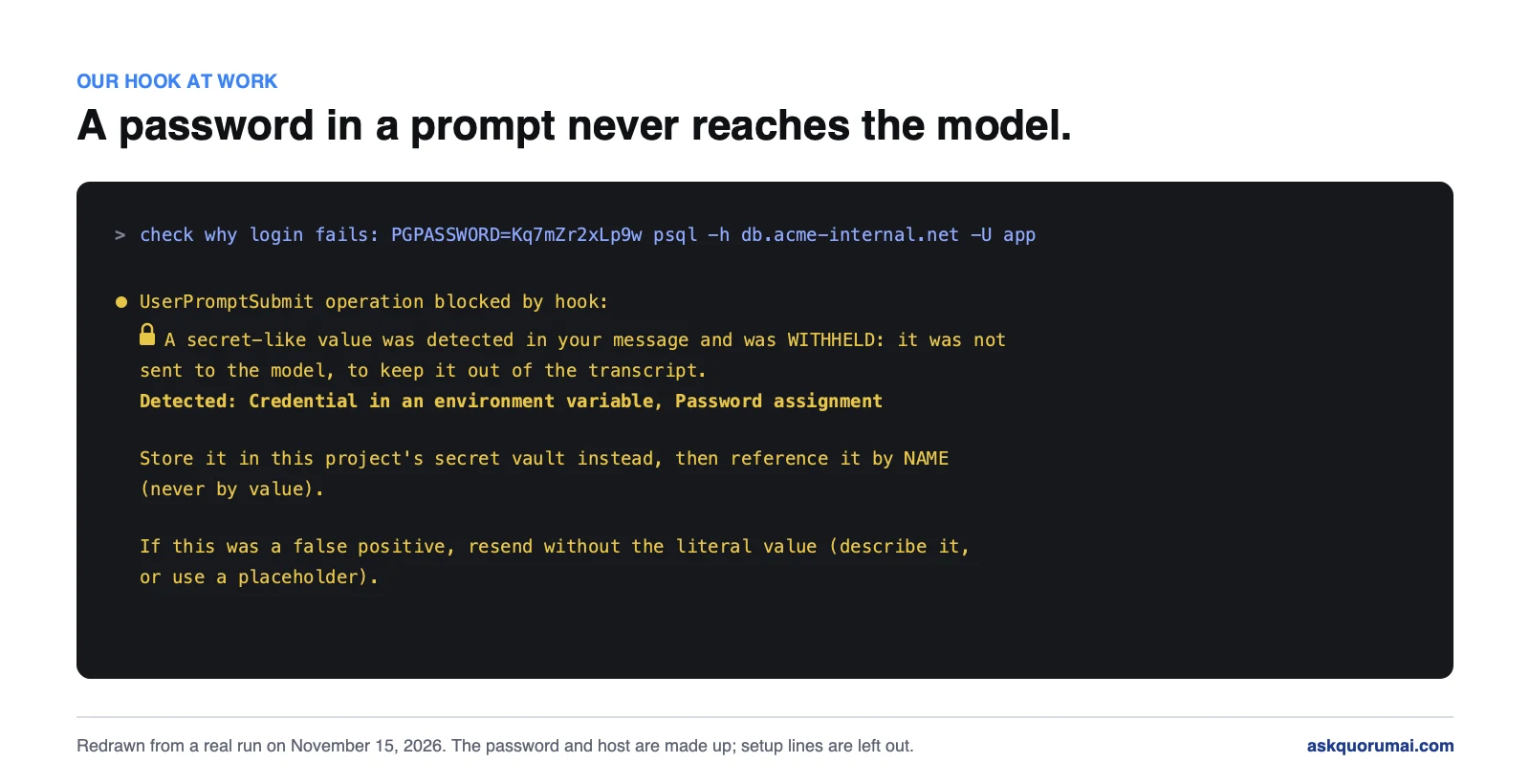
- A pasted password or key is stopped. A hook on every prompt catches a key, or a password written into a command or a connection string, pasted into the conversation, and withholds it before it reaches the model. It guards what a person types; what keeps the approved-commands file clean is the rule above, because the agent never has the value to write into it.
- A known secret cannot go into a command or a commit. A hook before each tool call blocks any value it knows from the vault, whether it appears in a command or in a file about to be committed.
- Every machine ignores the file. The global ignore rule is part of our standard machine setup, not left to the first time Claude Code writes it.
Where the secrets live: one rule, any store
The rule that matters is not where a secret is stored. It is that the agent gets a name, a command runs with the value, and the value never enters the session. That rule works with whichever store a company already trusts:
| Store | Suits | How the agent uses a secret without seeing it |
|---|---|---|
| Local vault on each engineer's machine | Small teams, one project set per engineer | A wrapper loads the project's secrets into one command's environment and masks the output. This is what we run on our own projects. |
| Cloud secret manager: AWS Secrets Manager, Azure Key Vault, Google Secret Manager, HashiCorp Vault | Teams on that cloud that want central rotation, access by role and an audit log | The engineer's own signed-in identity fetches the secret at run time and injects it into the command. Nothing is copied to the laptop. |
| Team secrets tool with a command line: 1Password, Doppler, Infisical | Teams that share credentials across many people | The tool's run command injects the secret into one command, scoped to the person's access. |
| Private MCP server on the company network | Production databases, payment systems, anything that should never leave the network | The agent calls a tool such as "run this read-only query on staging". The server holds the credential and does the work, so the secret never leaves the server and the agent only sees the result. |
Each step down the table moves the secret further from the engineer's machine. The last one is the strongest: the agent can use a system without any credential reaching the laptop at all. Whichever store a team picks, the hooks above still apply, so a value pasted into a prompt by hand is stopped either way.
We checked. On November 15, 2026 we ran the commands in section 3, plus a search of every local and shared settings file, across every repository we have worked in since these controls went in. None had a secret in an approved command, committed or not.
The limits, stated as plainly as in our Claude Code setup: the hook blocks values it knows from the vault, and a secret that never went into the vault is only warned about, not blocked. That is why the first rule is that secrets go into the vault, and why an engineer still reviews every change before it merges. Our security page covers how client data and credentials are handled across an engagement. If you want the same rules for your own team's agents, on the store you already use or a private server on your network, that is part of our AI consulting work.
The checklist
- Run the two
gitcommands in section 3 in every repository. - Search your GitHub organization, including forks, for the file name.
- Rotate any secret you find, then untrack the file.
- Add
**/.claude/settings.local.jsonto each repository's.gitignore. - Move secrets out of commands and into the environment, referred to by name, loaded from a vault or secret manager the agent cannot read.
- Review saved allow rules and delete any that contain a value.
- Tell the team: never answer "don't ask again" to a command with a secret in it.
If your team has also left Claude connectors on by default, review those in the same sitting: both are settings that decide what leaves your organization without anyone choosing it. The same goes for any third-party MCP server your agents connect to.
Common questions
Security firm Apiiro reported in early November 2026 that Claude Code saves a shell command approved with "Yes, and don't ask again" into .claude/settings.local.json, word for word. If the command contained a password, token or key, that value sits in the file as plain text, and when the file is committed it is published with the repository. Apiiro found 2,539 secrets this way across 1,994 public GitHub repositories.
Only on the machine that created it, and only if Claude Code created it. Anthropic's settings documentation says Claude Code adds the file to your global git excludes the first time it writes it. That rule lives on one developer's machine, not in the repository, so a clone on another machine, a folder that becomes a repository later or a file created by hand can still be committed. Apiiro reports the rule never goes into the project's own .gitignore.
Run git ls-files and git log --all for .claude/settings.local.json and .claude/settings.json in each repository. If either returns anything, open the file and the old versions and look for passwords, tokens and keys inside the approved commands. Then open the local copy on each developer's machine too, even if it was never committed. Do not rely on a secret scanner alone; Apiiro found 215 leaking files that Gitleaks and TruffleHog both missed.
Rotate the secret first, because anyone who cloned or forked the repository already has it. Then stop tracking the file with git rm --cached, add **/.claude/settings.local.json to the repository's .gitignore, and decide whether to purge it from history. On a public repository, assume the value is compromised.
Apiiro examined 16 coding agents and reported that Claude Code was the only one confirmed to save the full approved command in a project file by default. Any agent can still leak a secret that is typed into a command, so the fix that works everywhere is the same: never put a secret value in a command.
As at November 15, 2026, not in a released version that we can confirm. Boris Cherny, Anthropic's head of Claude Code, replied on Hacker News on November 7 that the team is looking at countermeasures, naming basic secret scanning and making auto mode catch this, and plans to prototype them before shipping. Until a fix ships, the checks in this post are yours to run.
Claude Code asks before it runs a command unless someone has approved that command in advance, and Anthropic documents permission settings and hooks for teams that want stricter rules. This leak is not a break-in; it is what happens when an approved command contains a secret and the settings file holding it is committed. How secure Claude Code is in practice depends on the setup around it, chiefly whether secrets ever appear in a command, which is what the steps in this post address.
Load the secret into the environment of the command that needs it and refer to it by name, so the command reads $DB_PASSWORD rather than the password. A secret manager's run command does this without the value appearing in the session, for example 1Password's op run, Doppler run or Infisical run. Avoid the env block in .claude/settings.json for secrets, because that file is often committed.
Secrets live in a vault outside every repository and the agent uses them by name. A wrapper loads them into the environment of the one command that needs them, so an approved command records a variable name, never a value. Hooks withhold a password or key pasted into the conversation before it reaches the model, and block a known vault secret from going into a command or a committed file. On November 15, 2026 we checked every repository we have worked in since those controls went in, and none had a secret in an approved command, in local or shared settings files.
Law and guidance as at 15 November 2026. This is general information, not legal advice.