On this page
New MCP servers arrive every week. A vendor ships one, a teammate finds one on GitHub, and connecting it to Claude takes a URL and a click. That is the point of the Model Context Protocol: any tool, one standard. It is also the risk. An MCP server gives an AI agent tools that can read your data, change it and act on your behalf, and the server decides what those tools say they do. This guide covers what to check before you connect one, drawn from the MCP specification's own security guidance, OWASP's MCP Top 10 and Anthropic's documentation.
Every risk and setting below is checked against the MCP Security Best Practices, the OWASP MCP Top 10 and Anthropic's documentation, linked in each section, as at November 18, 2026.
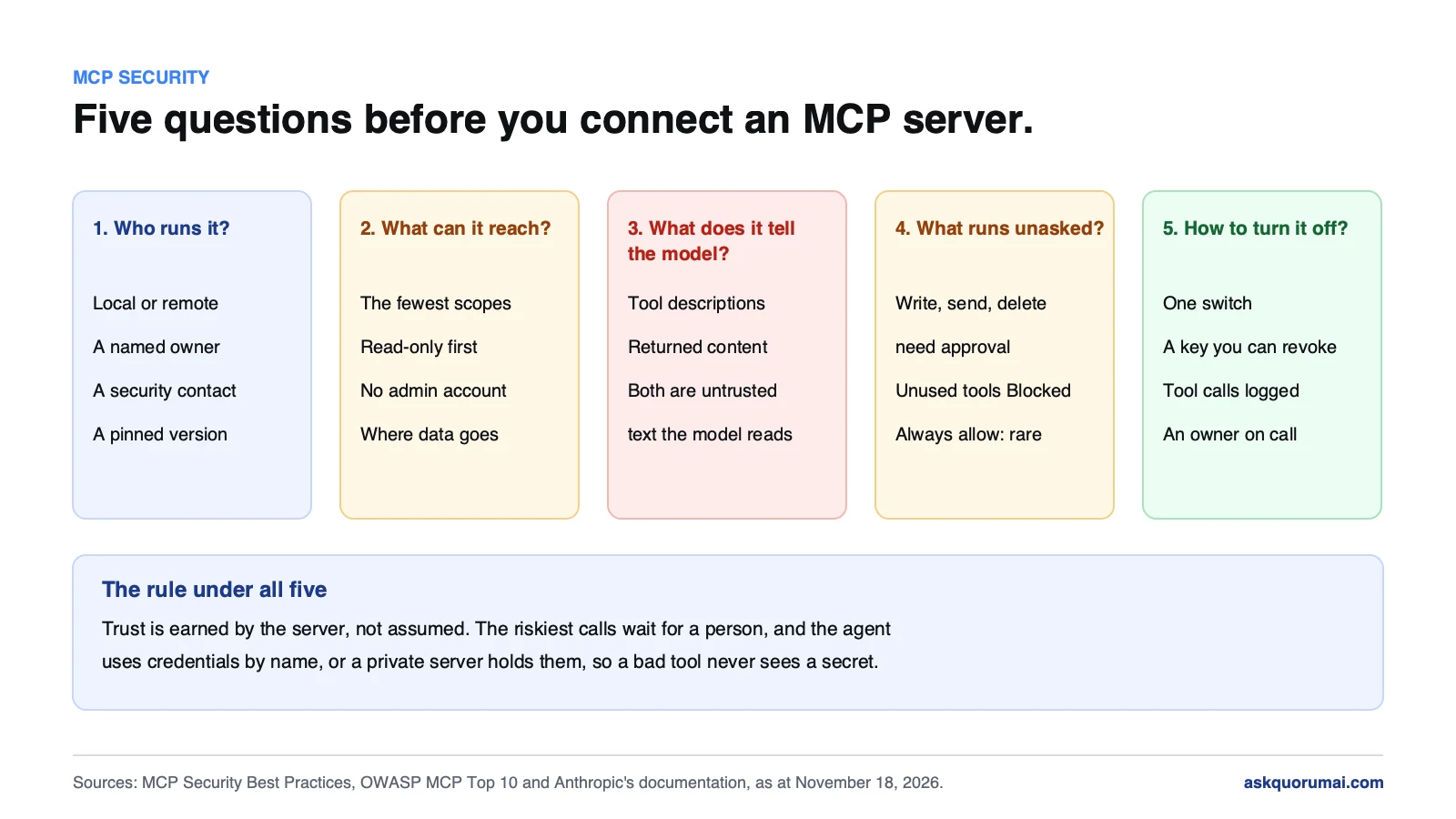
At a glance
| Risk | Where it comes from | What to check |
|---|---|---|
| Tool poisoning and prompt injection | Tool descriptions and tool results the model reads | Who wrote the server, and which tools can act without approval |
| Over-broad tokens | Scopes granted up front | The scopes on the consent screen, and the account behind them |
| Code running on your machine | Local servers started by a command | The exact command, and what it can reach |
| Tools that change later | Updates after you approved the server | A pinned version, and who reviews updates |
| Data leaving the organization | Tool calls that send content out | What each tool sends, and to where |
| No record of what happened | Missing logs | Whether tool calls are logged and kept |
1. Is MCP safe? What a server can actually do
MCP itself is a protocol, so "is MCP safe" really asks whether a particular server, with particular settings, is safe. Anthropic's answer for Claude is direct: a connector you add by URL connects Claude to an unverified service, and a remote MCP server gives Claude tools that can read data, create, modify or delete it, and take actions on your behalf.
The MCP specification puts the person in charge. Its tools page says there should always be a human in the loop with the ability to deny tool invocations, that clients must treat tool annotations as untrusted unless they come from trusted servers, and that clients should show tool inputs to the user before calling the server, to avoid data leaving by accident. Those three lines are the core of MCP server security: trust is earned by the server, not assumed, and the riskiest calls wait for a person.
2. MCP server risks: the six to know
Tool poisoning and prompt injection. A tool's description is text the model reads. A malicious server can hide instructions there, and OWASP lists this as MCP03, Tool Poisoning. Anthropic's custom connector guidance warns that malicious MCP servers may include hidden instructions that try to make Claude perform unintended actions. Returned content carries the same risk: Claude Code's MCP documentation notes that servers which fetch external content can expose you to prompt injection.
Tokens with more scope than the job needs. The specification's section on scope minimization describes the failure plainly: a token carrying broad scopes such as files:*, db:* or admin:*, granted up front, turns one leaked token into access to everything. OWASP lists the same pattern as MCP02, Privilege Escalation via Scope Creep, beside MCP01, Token Mismanagement and Secret Exposure.
A local server runs code as you. A local MCP server is a program started on your machine. The specification's section on local server compromise lists what goes wrong: a malicious startup command in a configuration, a malicious payload inside the server, or an insecure server left listening on localhost. It asks clients to show the exact command before running it and recommends running servers in a sandbox with minimal privileges.
Tools that change after you approved them. Anthropic tells users to monitor changes in tool behavior, because server developers may update it unexpectedly. A server you vetted last month is not the server you run today unless the version is pinned. OWASP's MCP04 covers the supply chain side.
Data leaving your organization. Every tool call can send content somewhere. OWASP's MCP10, Context Injection and Over-Sharing, covers the case where more context goes to a tool than it needs.
No record of what happened. OWASP's MCP08 is Lack of Audit and Telemetry. The specification's tools page says clients should log tool usage for audit purposes. Without logs, an incident is a guess.
For teams that build servers, the specification adds two rules worth knowing by name: a server must not accept tokens that were not issued to it (token passthrough), and a proxy server must get consent per client (the confused deputy problem). Ask any vendor whether their server follows both.
3. MCP server security checklist: vet before you connect
| Question | A good answer | A red flag |
|---|---|---|
| Who runs it? | A named organization you already trust, with a security contact | An unknown author, or no way to report a problem |
| Local or remote? | You know which, and why | A local server that downloads and runs code you have not read |
| What does it ask for? | The fewest scopes the job needs, read-only where possible | Omnibus scopes, or an admin account behind the token |
| Which tools can write or send? | Few, and each needs approval | Delete, send or pay tools set to run without asking |
| Which version runs? | Pinned, with updates reviewed | Always the latest, pulled at start-up |
| Where does data go? | Documented, inside your agreed providers | Unclear, or "we may use it to improve the service" |
| Is it logged? | Tool calls are logged and kept | Nothing you can see |
| How do you turn it off? | One switch, and a credential you can revoke | Shared keys nobody can rotate |
A server that fails two of these is not ready for work data. A server that fails the first one is not ready for any.
4. Settings that limit the damage
Vetting decides what you connect. Settings decide what a connected server can do, and they are where a mistake gets caught.
In Claude (web, desktop and mobile). On Team and Enterprise plans, an Owner adds custom connectors for the organization (on Enterprise, also a member whose custom role allows it), and members then sign in with their own accounts. Members can turn a connector on or off for each conversation from the + menu, and set any single tool to Blocked under Customize → Connectors. Anthropic's advice is to click Always allow only for trusted servers. We covered the organization-wide connector settings in Claude connectors on by default, and the same controls carry into the new unified Claude experience.
In Claude Code. A server can be configured in one of three scopes: local and user, stored in ~/.claude.json, or project, stored in .mcp.json and shared through version control. Claude Code asks for approval before using project-scoped servers in an interactive session, and a cloned repository cannot approve its own servers. One catch: the documentation notes that in claude -p runs and Agent SDK sessions it cannot show that prompt and loads project-scoped servers without asking, so headless runs need the same vetting up front. For a whole organization, managed MCP settings support allowedMcpServers and deniedMcpServers lists.
For servers inside your network. Claude Code runs on the engineer's machine, so it reaches what that machine reaches. Connectors in claude.ai are called from Anthropic's side. For those, Anthropic's MCP tunnels open an outbound-only connection from your network, so the server needs no public endpoint and the firewall needs no inbound rules. As at November 18, 2026 they are a research preview for Enterprise organizations by request, and Anthropic still asks you to require OAuth on each server and limit it to the tools it needs.
5. How to turn an MCP server off
Decide this before you need it. In Claude, remove a connector under Customize → Connectors, or Organization settings → Connectors for an Owner, and revoke its access in the third-party service too. In Claude Code, toggle the server off in the /mcp panel, which keeps its configuration, or run claude mcp remove <name>. Then rotate any credential the server held. If you find a malicious server, Anthropic asks you to report it to its Bug Bounty Program.
MCP security at AskQuorum AI: how we connect servers
We use MCP servers every day, so this is how our own setup works, not advice from a distance.
- We keep the list short. Our Claude Code setup connects a short list of servers for browser testing, documentation lookup and a map of the codebase, plus plugins from Anthropic's own marketplace.
- Credentials are scoped to the engagement. Each project gets its own credentials, nothing is shared across projects, and access is revoked when the engagement ends, as our security page sets out.
- Agents use secrets by name, never by value. A wrapper loads a secret into the one command that needs it and masks the output, so neither the model nor a saved approval ever holds the value. We explained the full setup, and the stores it works with, in Claude Code security: how we keep secrets out of the session.
- For the most sensitive systems, the credential stays on the server. A private MCP server on the company network holds the credential and does the work. The agent calls a narrow tool, such as a read-only query on staging, and sees the result, never the secret.
- A pasted credential is stopped. Hooks withhold a password or key pasted into the conversation before it reaches the model, and block a known secret from going into a command or a committed file.
The limits are the same as anywhere: a hook blocks the secrets it knows, and an engineer still reviews what an agent changes before it merges. If you want these rules on your own team's agents, or a private MCP server that connects Claude to a system without handing it the keys, that is part of our AI consulting and AI feature integration work.
The checklist
- List every connected MCP server in Claude and in each Claude Code project.
- Name an owner for each, and remove the ones without one.
- Check scopes on each consent screen; prefer read-only.
- Set write, send and delete tools to need approval, and block unused tools.
- Pin versions, and review updates before they run.
- Keep credentials out of the agent: by name, from a vault, or on a private server.
- Turn on logging for tool calls, and write down how to switch each server off.
If you are also reviewing what reaches the agent's commands, read how Claude Code secrets leak through settings.local.json in the same sitting: both decide what leaves your organization without anyone choosing it.
Common questions
The work of making sure a Model Context Protocol server, which gives an AI agent tools to read data and take actions, cannot be used to leak data, run unwanted commands or act with more access than it needs. It covers who runs the server, what credentials and scopes it holds, what its tool descriptions and results can tell the model, and what the client lets the model do without asking.
The protocol is a way to connect tools; whether a connection is safe depends on the server and the settings around it. Anthropic calls any connector added to Claude by URL an unverified service, and tells users to connect only to servers from trusted organizations, review permission scopes and watch for prompt injection. A vetted server with narrow scopes and approvals on its write tools is a reasonable risk; an unknown server with broad tokens is not.
An attack where a server hides instructions in a tool's description or other metadata. The model reads that text as context and may follow it, even though a person never sees it. OWASP lists it as MCP03 in its MCP Top 10. Anthropic's guidance warns that malicious MCP servers may include hidden instructions that try to make Claude perform unintended actions.
Prompt injection through tool descriptions and returned content, tokens with broader scopes than the job needs, a local server running code with your user's privileges, a server whose tools change after you approved them, data leaving your organization through tool calls, and too little logging to tell what happened. The MCP specification's Security Best Practices page and the OWASP MCP Top 10 cover each.
In Claude, open Customize, Connectors, select the connector and set that tool's permission to Blocked. You can also turn a connector off for a single conversation from the + menu. In Claude Code, toggle the server off in the /mcp panel, or remove it with claude mcp remove followed by the server name.
Claude Code runs on your machine, so it can reach a server your machine can reach. Connectors in claude.ai are called from Anthropic's side, so a private server needs a public endpoint or an MCP tunnel. Anthropic's MCP tunnels open an outbound-only connection from your network and need no inbound firewall rules; as at November 18, 2026 they are a research preview for Enterprise organizations by request.
We connect only servers we have checked, with credentials scoped to the engagement and revoked when it ends. Agents use secrets by name and never see the values, and where a system matters most we put the credential in a private MCP server on the client's network, so the agent sees results, not secrets. Hooks stop a pasted credential before it reaches the model.
Law and guidance as at 18 November 2026. This is general information, not legal advice.